You know your CRM is a mess. Duplicate records everywhere. Half the fields are blank. The other half have inconsistent data. Your sales team has stopped trusting it and built their own spreadsheets. Your marketing team segments based on data that was accurate two years ago. And every time you try to pull a report, you spend more time questioning the numbers than acting on them.
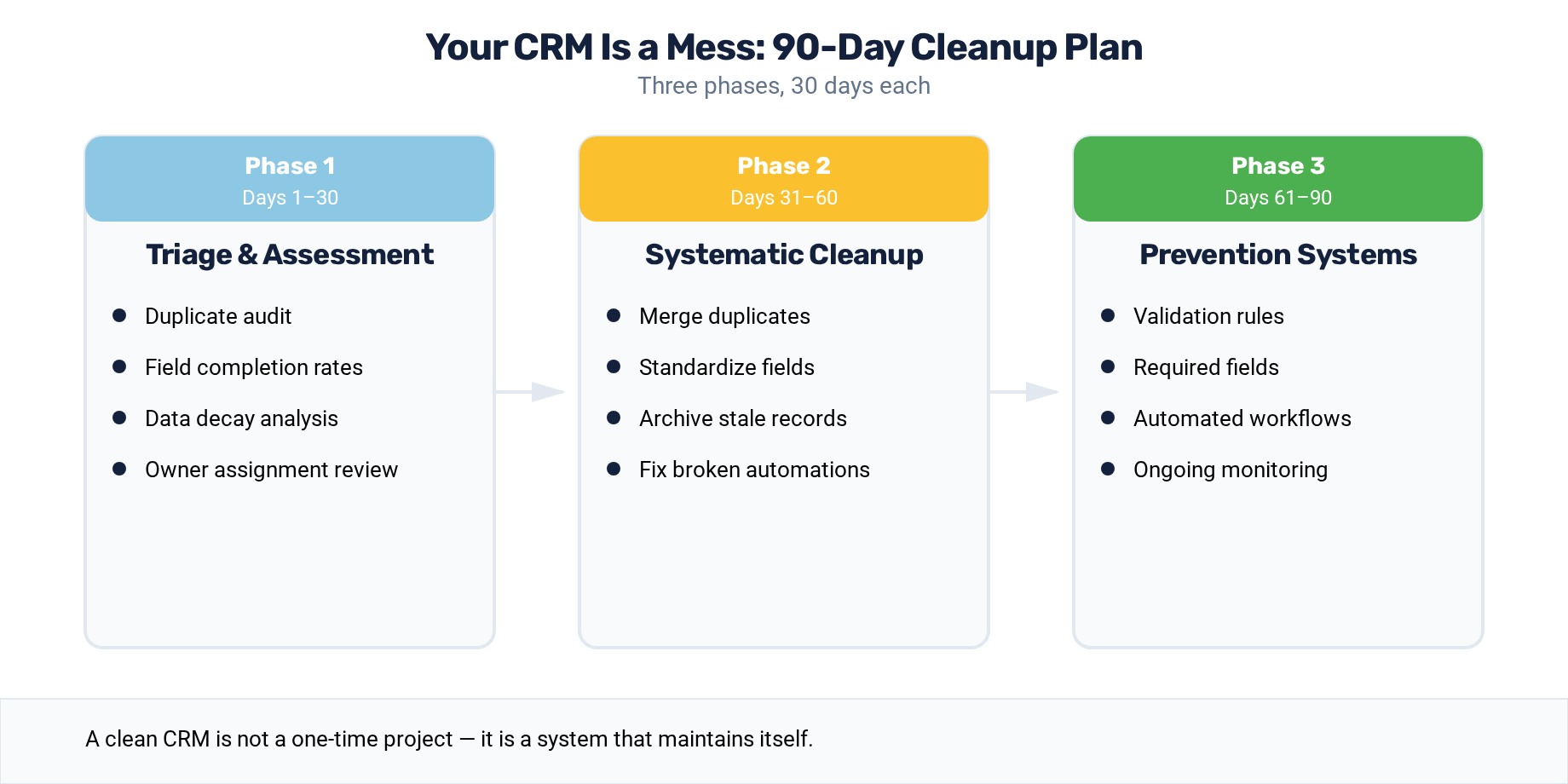
The good news: this is fixable. The bad news: it did not happen overnight, so it will not be fixed overnight either. Here is a structured 90-day plan that restores your CRM to a reliable, trusted system without disrupting daily operations.
Before You Start: The Pre-Cleanup Assessment
Do not start cleaning until you know what you are dealing with. Spend two to three days running a diagnostic assessment.
Record count audit. How many contacts, companies, and deals are in your database? What percentage are duplicates? HubSpot's duplicate management tool provides a starting point, but also check for near-duplicates with slightly different formatting.
Field completion analysis. For your 20 most important contact and company properties, what percentage of records have data? Build a simple report or export that shows completion rates for fields like email, phone, company name, job title, industry, lifecycle stage, and lead source.
Data age assessment. When were records last updated? What percentage of contacts have not engaged (no email opens, no page visits, no form submissions) in the last 12 months? These stale records are the dead weight pulling your metrics down.
Integration inventory. What systems feed data into your CRM? What data flows out? Each integration is a potential source of both good and bad data.
Document your findings. They become the baseline against which you measure progress.
Phase 1: Triage (Days 1-30)
The first 30 days focus on stopping the bleeding — preventing new bad data from entering and addressing the most damaging existing issues.
Week 1-2: Lock Down Data Entry
Before cleaning historical data, ensure that new data enters cleanly.
Standardize picklist values. Convert free-text fields to dropdown menus wherever possible. Industry, state, country, lead source, and job seniority should all be picklists. In HubSpot, edit the property settings and add predefined options. Restrict users from entering custom values.
Implement required fields. Identify the minimum data set needed for a useful record and make those fields required at key actions. For contacts: email, first name, last name, and company. For deals: amount, close date, pipeline stage, and associated contact. Configure these in HubSpot's record customization settings.
Build validation workflows. Create workflows that fire on record creation and flag records missing critical data. Send an internal notification to the record owner or a designated data steward when a new contact is created without a company association, or when a deal is created without a close date.
Week 3-4: Eliminate Duplicates
Deduplication delivers the highest immediate impact. Duplicate records distort every metric, confuse sales reps, and break automation logic.
Use HubSpot's built-in deduplication tool to identify and merge duplicate contacts and companies. Review the suggested matches and merge them, preserving the most complete and recent data from each record.
For bulk deduplication, consider a specialized tool like Insycle, which integrates directly with HubSpot and provides more sophisticated matching logic — fuzzy matching on names, domain-based company matching, and bulk merge operations.
Establish a deduplication workflow. Going forward, build a workflow that checks for existing records when new contacts are created and flags potential duplicates for review. This prevents the problem from recurring.
Phase 2: Standardize (Days 31-60)
With new data entry locked down and duplicates eliminated, the second phase focuses on standardizing the existing data.
Week 5-6: Normalize Key Fields
Work through your most important fields and standardize the values.
Company names. "IBM," "I.B.M.," "International Business Machines," and "IBM Corporation" are the same company recorded four different ways. Decide on a standard format and update records accordingly. For high-volume standardization, use HubSpot Operations Hub's data formatting tools or a third-party tool.
Job titles. Group job titles into standardized categories using a custom "Job Title Category" property. Map "VP Marketing," "Vice President of Marketing," "VP, Marketing," and "Marketing VP" to a single standardized value. Keep the original title for personalization but use the standardized field for segmentation and reporting.
Geographic data. Standardize state abbreviations, country names, and postal code formats. Build workflows that automatically convert common variations to your standard format.
Phone numbers. Strip formatting and apply a consistent format. HubSpot Operations Hub includes a phone number formatting action that handles this automatically.
Week 7-8: Fill Critical Gaps
After standardizing existing data, address the records with missing critical information.
Automated enrichment. Use a data enrichment service (HubSpot Insights, Clearbit, ZoomInfo, or similar) to fill in missing company data — industry, revenue range, employee count, location — based on email domain. This can fill 60-80% of missing company-level data automatically.
Progressive profiling campaigns. For contacts who are actively engaging with your content, deploy progressive profiling forms that ask for one or two missing data points at each interaction. This gradually completes records without creating friction.
Manual enrichment. For high-value accounts and active pipeline contacts, assign manual enrichment to your team. Reps should update records for their active deals as part of their standard workflow.
Phase 3: Govern (Days 61-90)
The final phase establishes the governance framework that prevents your CRM from sliding back into chaos.
Week 9-10: Build the Data Quality Dashboard
Create a HubSpot dashboard that monitors data health in real time. Include these reports:
- Field completion rates for the top 20 properties, with trendlines showing improvement over time
- Duplicate detection rate — new duplicates identified per week
- Stale record count — contacts with no engagement in 180+ days
- Data quality score — a composite metric combining completeness, accuracy, and freshness
Review this dashboard weekly. Assign ownership for maintaining data quality scores above defined thresholds.
Week 11-12: Establish Ongoing Processes
Monthly data quality reviews. Schedule a recurring monthly review where the data steward or operations team assesses data quality metrics, addresses emerging issues, and updates governance rules.
Quarterly deep audits. Every quarter, run a comprehensive audit of data quality across all critical fields. Compare against your original baseline to measure progress and identify areas that need attention.
Annual stale record purge. Once a year, identify records that have had zero engagement in 12+ months and either suppress them from active lists (to reduce HubSpot costs and improve deliverability) or delete them after appropriate review.
New hire training. Include CRM data standards in every new hire's onboarding. When people understand the expectations from day one, compliance is dramatically higher than when standards are introduced after habits have formed. Sustaining these improvements long-term requires understanding the psychology behind why people resist data governance — and designing your processes around those behaviors.
Documentation
Document your data standards in a living document that covers:
- Required fields by record type
- Standardized values for key picklist fields
- Naming conventions for companies, campaigns, and assets
- Data entry guidelines with examples
- Escalation process for data quality issues
Store this document somewhere visible — a shared drive, a wiki page, or pinned in the team's communication channel. Standards that nobody can find are standards that nobody follows.
Measuring Success
At the end of 90 days, compare your current metrics against your pre-cleanup baseline:
- Duplicate rate should have dropped by 80% or more
- Field completion rates for critical properties should be above 85%
- Stale record percentage should be reduced by at least 50%
- Report trust — survey your team and ask whether they trust the data in HubSpot. This qualitative metric matters as much as the quantitative ones
A clean CRM is not the end goal. A trusted CRM that stays clean is the goal. The 90-day plan gets you clean. The governance framework keeps you there.
For PE portfolio companies, CRM cleanup is often the first step in a broader post-acquisition technology integration. Operating partners who mandate data hygiene standards across the portfolio create the foundation for reliable cross-company reporting and benchmarking.
Keep Reading
- PE Implementation Roadmap — Phase 1 data assessment leads to this cleanup.
- How to Evaluate a Portfolio Company's HubSpot — Evaluation identifies the data quality issues.
- Hidden Revenue Leak: Poor Sales Data Quality — What dirty data costs your pipeline.
- DataOps Implementation Services — We execute data cleansing and enrichment.
- 100-Day CRM Integration Playbook — For post-acquisition CRM cleanup at the portfolio level.
How healthy is your portfolio company's CRM? Take the free assessment — 7 minutes, instant results.